![taxtraders-black-1.png]](https://knowledge.taxtraders.co.nz/hs-fs/hubfs/taxtraders-black-1.png?height=28&name=taxtraders-black-1.png)
Who can manage ProvCheck access
| Role | What they can do |
|---|---|
| Owner | Turn ProvCheck on or off for anyone in the branch, including other Owners and themselves |
| Administrator | Turn ProvCheck on or off for Administrators, Users and Read-only users, including themselves |
| User and Read-only | Can’t see or change ProvCheck access |
| Contact | Can’t be given ProvCheck access, because Contacts are not able to log in to the portal. |
An Administrator doesn’t need ProvCheck access themselves to give it to someone else.
Turning ProvCheck on or off for a team member
- Log in to the Tax Traders portal and go to Manage access.
- If you belong to more than one branch, select the branch tab you want.
- Find the team member in the list and use the switch in the ProvCheck access column to turn their access on or off.
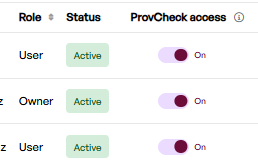
- A confirmation appears, for example “ProvCheck access has been activated for Jane Smith.”
When a user is provided access to ProvCheck, we send them an email saying “You now have access to ProvCheck”.
Can’t see the ProvCheck access column? It only appears when ProvCheck is enabled for your branch and you’re an Owner or Administrator. If you think it should be there, please get in touch with us.
Seeing a padlock instead of a switch? You can’t change ProvCheck access for someone whose role is higher than yours. Hover over the padlock to see why.
Giving ProvCheck access to a new team member
When you add someone using Grant access, tick Grant ProvCheck access to give them access at the same time.
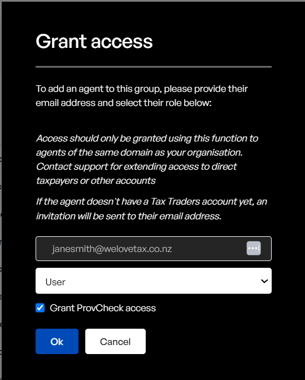
If you’re inviting someone new, they need to create their account first before ProvCheck access can be provided. Once they’ve registered, come back to Manage access and switch ProvCheck on for them.
Contact our team at team@taxtraders.co.nz and we’ll be happy to help.