![taxtraders-black-1.png]](https://knowledge.taxtraders.co.nz/hs-fs/hubfs/taxtraders-black-1.png?height=28&name=taxtraders-black-1.png)
Who can add client access
You can add client access if you’re an Owner, Administrator or have Direct access to the taxpayer.
Read-only users and Contacts can’t add client access.
Choosing the right level of access
| Access level | What your client can do |
|---|---|
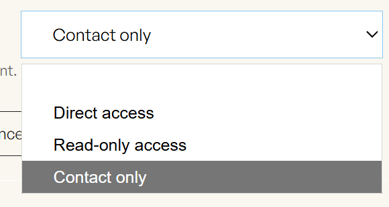
| Direct access | Log in and manage the taxpayer’s account, for example putting arrangements in place or selling funds from the account |
| Read-only access | Log in and view the taxpayer’s account, but unable to make any changes |
| Contact only | Receive emails about the taxpayer, but not able to log in or see the account |
The access level starts on Contact only, so remember to change it if your client needs to log in.
Adding a client
- Open the taxpayer and go to Taxpayer settings.
- In the Access section, click Add client access.
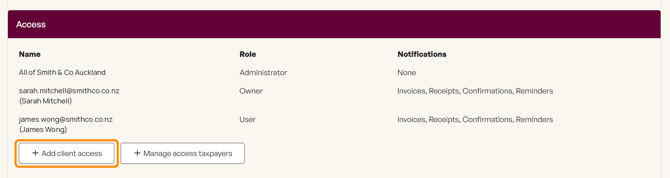
- Enter your client’s first name, last name and email address.
- Choose their access level.
- Click Add client access.
Once this has been submitted, a message will confirm what has happened.
What your client receives
Direct access or Read-only access, if they do not yet have a Tax Traders account: We email them an invitation to sign in or create an account. Until they register, they show in the Access list with (Invited) next to their name.
Direct access or Read-only access, already has an account: They get access straight away, plus an email letting them know their access has been updated.
Contact only: We email them to let them know they’ve been added as a contact, and what kind of emails they can expect. They don’t need to create an account.
The emails come from your firm and include your name, so your client knows who added them.
Changing a client’s access level
To change someone’s access, use Add client access again with the same email address and choose the new level. The change takes effect straight away.
Good to know:
- If they already have that access level, nothing changes and no email is sent.
- If you add someone who’s still invited, we’ll send their invitation again.
Good to know
- Access is for this taxpayer only. Your client won’t see any other taxpayers on your firm’s list.
- Restricted taxpayers. You can’t add client access to a restricted taxpayer. Contact our team, and we will be able to help further
- Removing access. To remove a client, click Remove Access next to their name in the Access list.
Need help?
Contact our team at team@taxtraders.co.nz and we’ll be happy to help.