![taxtraders-black-1.png]](https://knowledge.taxtraders.co.nz/hs-fs/hubfs/taxtraders-black-1.png?height=28&name=taxtraders-black-1.png)
The Attention Needed Report lists your taxpayers that have either not filed their return or have any outstanding balance at Inland Revenue (IR). You can filter the report to show only the taxpayers on your My Taxpayers list, view All Taxpayers, or you can also filter by terminal tax date.
The Tax to Pay, Payments and Pool Positions, and Net Position columns mirror the totals shown in each taxpayer’s Combined Report. Please note that these totals exclude any interest and penalties charged by IR and the net position will display File return until IR has assessed the taxpayer’s return.
The Attention Needed Report is available to users on IR connection and who is part of a firmwide access group. Both are available free of charge.
How to use the report
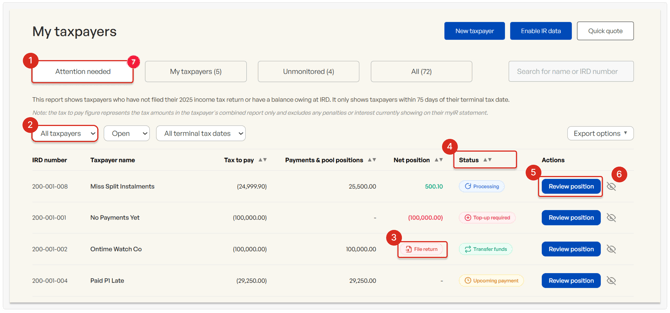
- Open the Attention Needed tab
- Choose your filter:
- My taxpayers – shows only your clients
- All taxpayers –shows the full list of clients for your organisation
- If a taxpayer’s filing deadline has passed, wait until you have filed their return with IR before initiating transfers. IR may reject transfers if the return is not yet filed.
- Take action based on each taxpayer's status.
- Use Review position to go to the taxpayer's Combined Report and review detailed information.
- When finished, either hide the taxpayer or complete the complete funds confirmation (Taxpayer settings → Funds confirmation).
Statuses and required actions
Use the taxpayer status and the Review position button to take action.
|
Status |
Action required |
|
Top-up required |
The taxpayer needs more tax credits to cover their liability. For example, you can arrange further tax purchases, use deposits from other periods or from an associated taxpayers, or pay IR directly. |
|
Upcoming payment |
The taxpayer’s liability is expected to clear the remaining liability at IR when they complete their purchase arrangement and transfer the funds to IR. |
|
Transfer funds |
The taxpayer has available balances. Use the Finalise year-end button on the Combined Report. Surplus funds can be sold, transferred to associated taxpayers or used for future periods. |
|
Processing |
Transfers from Tax Traders are already in progress and we expect this to clear the taxpayer's liability at IR. |
|
No arrangement |
There is a balance owing at IR, and no Tax Traders arrangement is currently in place. This often indicates residual penalties or interest due at IR. |
Frequently asked questions
How often is the report updated?
The report is updated daily based on data received from IR. Refreshing the report will show any changes to Tax Traders’ arrangements.
My taxpayer shows a nil net position. Why are they still listed?
A zero net position in the Combined Report may indicate unresolved penalties or interest at IR. Expand the IR statement summary at the bottom of the Combined Report to view any outstanding amounts.
Does the report show positions held in other tax pools?
No, the report only includes positions held with Tax Traders. You can request for positions to be transferred from other providers to Tax Traders with no impact on their effective date. Contact team@taxtraders.co.nz to make a request.
Why is a negative balance showing after transfers have been arranged?
This can happen because of timing differences between when funds leave Tax Traders and show up at IR. This will resolve once the funds have been processed at IR’s end. Their standard processing timelines are 15 working days once Tax Traders has sent these across.